



To connect to Premium residential proxies, use:
- Domain.
- Port.
- Username.
- Password.
The password may be long when many settings are used. Default proxy format: domain:port:username:password
Example: premium.proxywing.com:12345:username:pass_country-us_city-newyorkcity_isp-centurylinkcommunicationsllc_session-N0xHjsgx
domain | premium.proxywing.com |
|---|---|
port | 12345 |
username | username |
password | pass_country-us_city-newyorkcity_isp-centurylinkcommunicationsllc_session-N0xHjsgx |
Basic format

By default:domain:port:username:password
Also available:domain:port@username:passwordusername:password:domain:portusername:password@domain:port
If you need a different format, use the free Proxy Formatter.
Hostname and IP address
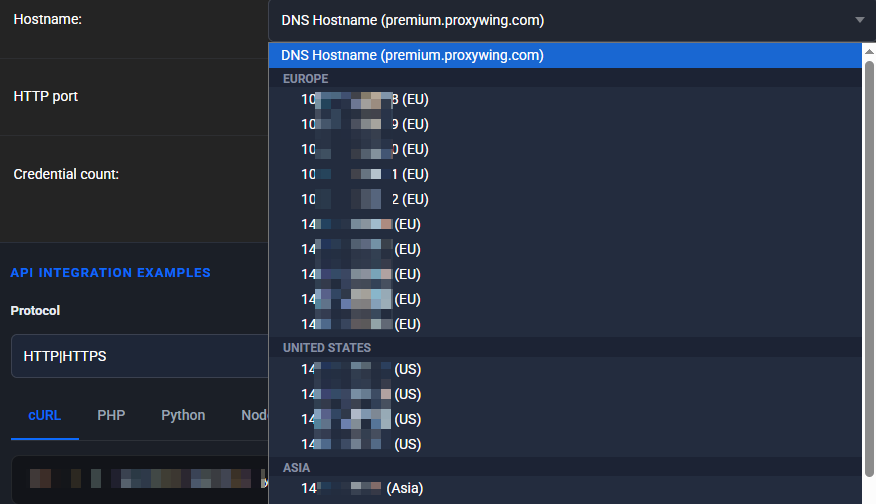
In the Hostname field, you can use:
- ProxyWing DNS hostname.
- A specific entry server IP address.
Selecting an IP address allows you to choose an entry server that is closer to the user on the network. This can reduce latency if the connection to the DNS hostname has high ping.
The geolocation of the exit residential IP is configured separately through country, city, and ISP. Selecting an entry IP address does not change the selected geolocation of the exit proxy.
Authentication
Premium residential proxies use username and password authentication.
IP whitelist is not supported for Premium residential proxies.